The world of e-commerce is changing faster than ever. In just the past decade, online shopping has become the new normal. People now expect fast delivery, real-time order updates, and products always in stock. For businesses, meeting these expectations is not easy. The old way of tracking products with spreadsheets or even pen and paper simply cannot keep up. As customer demands and supply chains grow more complex, traditional inventory management systems often slow businesses down or cause costly mistakes.
But here’s the good news: automation in inventory management is transforming how e-commerce companies operate. Software like Bizmation is leading this change, helping businesses save time, reduce errors, and scale up with confidence. In this deep dive, you’ll see why manual inventory management is risky, what automation really means, and how Bizmation stands out as a trusted solution for modern online retailers.
Manual inventory management may seem simple at first, especially for small stores with only a few products. But as your business grows or moves online, the problems start to multiply. Here’s why manual systems struggle in today’s e-commerce world:
When people count and record stock by hand or in spreadsheets, mistakes happen. Common errors include:
Entering the wrong quantity
Forgetting to update after a sale
Losing track of returns or damaged goods
A single error can lead to overselling (selling more than you have) or stockouts (running out of popular items). Both hurt your reputation and profits.
Let’s look at a real-world example: Imagine you sell handmade candles. You have 20 in stock, but after a busy day, you forget to subtract 5 sold on your website. The next day, you sell 18 more on Amazon, thinking you still have enough. Now, you have to cancel orders, disappoint customers, and possibly get negative reviews. These errors not only cost money but can also damage your business reputation.
Another common mistake is double-counting or missing items during restocking. Suppose your staff is tired after a long day and accidentally records 50 units instead of 15. That single error can lead to weeks of confusion, missed sales, or even customer complaints if out-of-stock items are still listed for sale.
Also, manual tracking makes it hard to handle product variations, like different sizes or colors. If you forget to update the inventory for each variation, it’s easy to lose control over what’s actually available.
Non-obvious insight: Even the most careful, experienced staff can make errors during busy sales periods or after working long hours. Human error is not just about carelessness—it’s about natural limitations.
Updating inventory by hand is slow. Staff must check shelves, count products, and adjust records every day. This takes hours that could be spent serving customers or growing your business.
For a small shop with 100 items, a single stock count might take 2-3 hours. For a store with 500 or 1,000 items, the process can take all day—especially if you have products in more than one location.
During busy sales periods, like holidays or sales events, these manual checks often get skipped or rushed, increasing the risk of mistakes. And when new products arrive, it takes even more time to check them in and update all your records.
This slows down your ability to launch new products or respond to market trends.
Plus, manual processes often require coordination between several people. One person might take the physical count, another updates the spreadsheet, and a manager reviews the results. Any miscommunication can cause further delays.
Practical example: Imagine you run out of a popular item on Friday night. With manual systems, you might not realize it until Monday, after you’ve lost weekend sales. Automation can flag low stock instantly, helping you react faster.
Manual systems rarely give you a clear, real-time view of what’s in stock. You may not know which products sell fastest, which are about to run out, or when to reorder. This can lead to:
Missed sales opportunities
Too much money tied up in slow-moving products
Late deliveries to customers
Suppose you sell electronics with many models and accessories. Without real-time visibility, you might reorder products you already have, or miss the chance to promote items before they go out of stock. Manual systems also make it harder to spot trends, like rising demand for certain products or seasonal shifts in sales.
Another issue is the risk of misjudging which items are profitable. If you don’t have up-to-date sales and stock data, you might keep investing in products that don’t sell, while missing out on high performers.
Non-obvious insight: Lack of visibility can also hurt negotiations with suppliers. If you can’t prove which products move fastest, you may miss out on bulk discounts or better payment terms.
Without automation, it’s easy to miss theft, damage, or lost items. Over time, this “inventory shrinkage” adds up. According to the National Retail Federation, U.S. retailers lose about 1.4% of their inventory each year to shrinkage. For a $1 million business, that’s $14,000 lost.
Shrinkage comes from many sources: employee theft, shoplifting, supplier fraud, and simple misplacement. Manual tracking rarely catches these issues quickly. By the time you notice, the losses are much larger.
If you work with multiple warehouses or fulfillment centers, shrinkage can be even harder to detect. Items may go missing in transit, or records may be updated incorrectly. This not only affects profits but can also create legal and insurance headaches.
Practical tip: Regular, automated inventory audits can quickly spot shrinkage, allowing you to take action before losses grow.
As you add more products or sell on new channels (like Amazon, Shopify, or eBay), manual tracking quickly becomes unmanageable. You need a system that grows with you, not one that holds you back.
Let’s say you start with 50 products and one sales channel. Manual tracking is possible, though time-consuming. But what happens when you grow to 500 products, or start selling on three or four different platforms? Suddenly, you’re updating multiple spreadsheets, logging into different dashboards, and trying to match orders with inventory by hand.
This bottleneck can stop your business from expanding. You might avoid adding new products or sales channels, just to keep things “manageable. ” This means missed opportunities for growth.
Real-world scenario: Many growing businesses hit a wall at around 200-300 SKUs (stock keeping units) when using manual systems. They either stop growing or risk chaos and customer complaints.
---
The answer to these challenges is inventory management software automation. But what does that really mean? Let’s break it down simply.
Automated software connects with your online store, warehouse, and even your suppliers. Every time you sell an item, the system updates your inventory automatically—no more manual counting or updating spreadsheets.
This real-time tracking means that your stock levels are always accurate, no matter how many sales channels you use. For example, if you sell an item on eBay, the system instantly reduces the available stock on your website and Amazon store too.
This prevents overselling and disappoints fewer customers.
Automation also means you’re never in the dark about what’s happening in your business. You can see live updates as orders come in, as new stock arrives, or as returns are processed.
Example: If you run a flash sale, you can watch your stock drop in real time and pause the sale automatically when you run out—no more angry emails from customers whose orders can’t be filled.
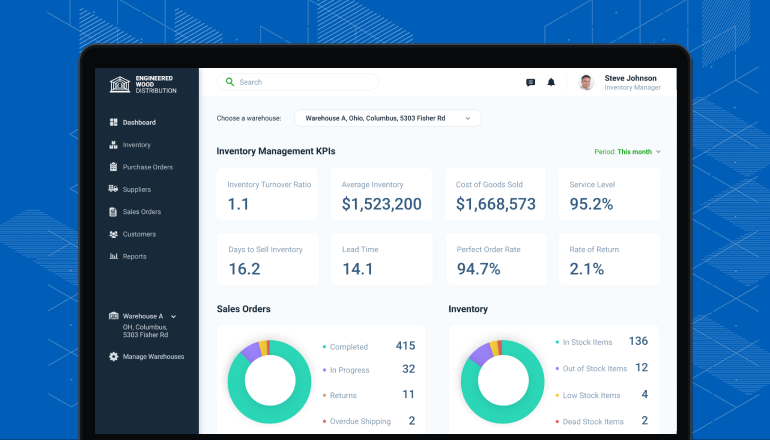
You get one central dashboard showing all your products, stock levels, and sales across every channel. Whether you sell on your own website, marketplaces, or physical stores, all data is in one place.
This centralized view saves hours of work each week. Instead of checking multiple spreadsheets or logging into different platforms, you see everything in one interface. This makes it easier to spot problems, like slow-moving inventory or sudden spikes in demand.
A centralized system also makes it easier to manage staff permissions. For example, you can give your warehouse team access to stock counts, while your sales team sees order history. This improves security and efficiency.
Non-obvious insight: Centralized data also simplifies accounting and tax reporting. With all your sales and inventory data in one place, it’s much easier to prepare accurate reports and avoid costly mistakes at tax time.
The software can warn you when stock is low and even reorder products automatically. This reduces the risk of running out or overstocking items that don’t sell.
You set minimum and maximum stock levels for each product. When inventory drops below the minimum, the system can send you an alert, create a purchase order, or even place the order with your supplier. This prevents stockouts and ensures you never miss a sale.
Smart reordering also helps you avoid tying up cash in excess inventory. The system can analyze past sales and seasonal trends to predict exactly how much to order, reducing waste and storage costs.
Example: A beauty supply store might sell more skincare products in winter. Automation can spot this trend, increase reorder quantities in advance, and keep shelves full without manual guesswork.
Modern inventory automation doesn’t work alone. It connects with:
Accounting software (like QuickBooks or Xero)
Shipping solutions
CRM (customer relationship management)
POS (point of sale) systems
This means less data entry, fewer errors, and more time saved.
For example, when an order is fulfilled, the system automatically updates your accounting records, adjusts inventory, and sends shipping information to the customer. If you use a POS in a physical store, sales are synced with your online inventory instantly.
Integrations also make it easier to launch new sales channels or expand into new markets. You can add a new platform and have your products, prices, and inventory sync automatically.
Non-obvious insight: Integrations with supplier systems can even let you drop-ship products or automate restocking, reducing your need for physical storage.
Automated systems do more than count stock. They help you understand:
Which products are most popular
How fast each item sells (turnover rate)
Seasonal trends
Where you’re losing money
This data helps you make smarter decisions, plan better, and boost profits.
You can quickly generate reports to see which products are driving most of your revenue, and which ones are sitting on the shelf. You can spot slow-moving stock and decide to run promotions or discontinue them. You can also track profitability by product, category, or sales channel.
Example: If you notice returns are high for a specific item, you can investigate the cause—maybe there’s a quality issue, or customers don’t understand sizing. Fixing these problems can save money and improve customer satisfaction.
Imagine running a store selling 500 products across your website, Amazon, and a physical shop. With automation:
Every sale updates stock instantly everywhere
You get alerts before you run out
Reports show your top sellers and dead stock
Staff spend less time counting and more time helping customers
This is not just about saving time. It’s about growing your business with confidence.
Practical scenario: Let’s say your business is growing fast. You add 100 new products this month and start selling on a new channel. With manual systems, this could take weeks of setup. With automation, you can import products, sync inventory, and start selling in days.
---
Inventory automation is just the start. In the fast-moving world of e-commerce, automation now covers many parts of the business. Companies who use these tools get a real edge over their competition.
Automated systems can:
Send order confirmations and shipping updates to customers instantly
Create and print shipping labels automatically
Update order status in real time
This means fewer mistakes, faster shipping, and happier customers.
Processing orders by hand takes time and is prone to errors. With automation, as soon as an order is received, the picking list is generated, shipping labels are printed, and tracking numbers are sent to the customer. This can reduce average order processing time from hours to minutes.
Real-world impact: During busy seasons, such as Black Friday, automation can help you process hundreds of orders a day without hiring extra staff or working overtime.
Many e-commerce platforms use chatbots or automated email responses to handle simple questions (like “Where’s my order? ”). This frees up staff to help with more complex problems.
Automation can also handle order tracking requests, returns, and common FAQs. Customers get answers 24/7, improving satisfaction and loyalty.
Example: If a customer asks about their delivery status, an automated system can pull the tracking number and expected arrival date instantly—no need for your team to search manually.
Automation makes returns easier for both you and your customers. The system can:
Approve returns automatically based on rules you set
Update inventory when items come back
Trigger refunds or exchanges
Efficient returns management is critical in e-commerce, where return rates can be 20% or higher for some categories. Automation ensures returns are processed quickly, inventory is updated, and refunds are issued without delay.
Non-obvious insight: Efficient returns automation can actually be a selling point. Customers are more likely to buy if they know returns are fast and easy.
Selling on many platforms (your own site, Amazon, eBay, social media) is easier with automation. The system syncs inventory, prices, and product details everywhere. You avoid overselling and keep all your channels up to date.
Multi-channel selling increases your reach and sales potential, but it can be a nightmare to manage manually. Automation handles the complexity, allowing you to expand quickly and confidently.
Practical example: If you change the price of a product, automation updates it everywhere instantly—no risk of mismatches or customer confusion.
Some advanced tools even adjust prices or launch promotions automatically based on sales trends, demand, or competitor prices.
Dynamic pricing can help you maximize profits, respond to changing market conditions, and stay competitive. For example, if a competitor lowers their price, your system can match or beat it automatically.
Promotions can also be scheduled and managed automatically, ensuring they start and end at the right times and only apply to the products you choose.
Automated software can:
Track supplier performance (like delivery times and product quality)
Reorder products based on sales forecasts
Communicate automatically with vendors
This improves relationships with suppliers, ensures you get the best prices, and reduces the risk of stockouts.
Non-obvious insight: Automation can also help you spot unreliable suppliers before they hurt your business, by tracking late deliveries or quality issues over time.
Suppose two online stores sell the same products. Store A uses manual systems; Store B uses automation. Store B will process orders faster, keep inventory accurate, and give better customer service. Over time, Store B will win more customers, get better reviews, and grow faster.
Non-obvious insight: Automation is not just for big companies. Many small businesses think it’s too expensive or complex. But modern solutions like Bizmation are designed for all sizes, with easy setup and affordable plans.
---
In the world of e-commerce automation, choosing the right partner is key. Bizmation stands out as a trusted provider of inventory and business automation solutions. But what makes Bizmation different?
Bizmation understands that every business is unique. Whether you’re just starting out or already selling thousands of products, Bizmation offers tools that scale with you. Their platform works for solo entrepreneurs, growing startups, and established brands.
Unlike some platforms that only serve large enterprises, Bizmation offers flexible pricing and features that grow as you do. You can start with basic inventory management and add advanced automation, analytics, or integrations as your needs change.
With Bizmation, you get more than just inventory management. The platform covers:
Inventory tracking and automation
Order management
Shipping and fulfillment
Analytics and reporting
Integrations with popular e-commerce channels
This means you can manage your entire business from a single dashboard. No more switching between multiple tools, copying data, or trying to make different systems work together.
Practical tip: Using an all-in-one platform reduces training time for new staff, lowers costs, and improves efficiency.
You don’t need to be a tech expert to use Bizmation. The dashboard is simple, clear, and designed for people who want to get things done—not fight with complicated menus.
Bizmation invests in user experience, so you can find what you need quickly. Common tasks—like checking stock, processing orders, or creating reports—are just a few clicks away.
Non-obvious insight: A user-friendly system reduces errors, lowers staff frustration, and helps you get more value from your software.
Bizmation offers support through chat, email, and phone. Their team understands the real challenges e-commerce businesses face and can help quickly when you need it.
Support is available during key business hours and often extends to weekends or holidays—vital for online stores that never sleep. Bizmation’s support team can help with setup, troubleshooting, or even training.
Real-world feedback: Many Bizmation users report that fast, helpful support is a major reason they chose (and stayed with) the platform.
Your data is safe with Bizmation. All information is stored securely in the cloud. You can access your dashboard from anywhere—at the office, at home, or on the go.
Cloud-based platforms mean you don’t have to worry about installing software, maintaining servers, or making backups. Bizmation handles security updates and backups automatically, so your data is always protected.
Non-obvious insight: Cloud access also means you can collaborate with remote staff, outsource fulfillment, or manage multiple locations with ease.
To understand what sets Bizmation apart, see this side-by-side look:
|
Feature |
Manual/Traditional Systems |
Bizmation |
|---|---|---|
|
Inventory Updates |
Manual, slow |
Automatic, real-time |
|
Order Sync |
Requires manual entry |
Automatic across all channels |
|
Reporting |
Spreadsheet-based, limited |
Detailed, visual, instant |
|
Multi-Channel Support |
Difficult, error-prone |
Easy, centralized |
|
Scalability |
Hard to grow |
Grows with your business |
Practical insight: Many businesses only realize how much time they lose with manual systems after switching to automation. The difference is like moving from walking to driving a car.
---
Why do successful e-commerce companies choose Bizmation? Here are the main reasons:
With Bizmation, you automate manual tasks like:
Stock counting
Order processing
Report generation
This means fewer staff hours spent on routine work, and more time for growth. For example, companies using Bizmation report saving up to 80% of the time they previously spent on inventory tasks.
Deeper example: If your business spends 20 hours a week on inventory and order tasks, automation can give you back 16 of those hours. That’s two full working days—time you can use to launch new products, run marketing campaigns, or improve customer service.
Automation greatly reduces mistakes. You avoid overselling, underselling, or delivering the wrong product. Fewer errors mean happier customers and lower costs.
Error reduction also protects your reputation. Online reviews are public and permanent; a few negative experiences due to errors can hurt your business for months. Automation helps maintain high ratings and customer trust.
Non-obvious insight: Fewer errors also reduce stress for your team and make hiring and training easier, since new staff have less to learn and fewer chances to make costly mistakes.
Bizmation’s dashboard gives you a live snapshot of your entire business. At any moment, you can see:
What’s in stock
What’s selling fastest
Which orders are in progress
This helps you make smart decisions quickly.
Example: If a product starts selling much faster than usual, you can reorder right away, run a promotion, or adjust prices to maximize profits.
The system tracks sales trends and predicts when you’ll need to reorder. This avoids both stockouts and excess inventory. With smart reordering, you keep your cash flow healthy and your customers satisfied.
Bizmation can also help you manage supplier lead times. If it takes two weeks to restock a product, the system can alert you early enough to avoid running out.
Practical tip: Smart reordering uses real sales data, not just guesses or averages, making your inventory planning much more accurate.
Bizmation connects with popular e-commerce platforms (Shopify, WooCommerce, Amazon, eBay) and tools like accounting software. You don’t need to enter data twice—everything flows automatically.
This saves time, reduces errors, and makes it easier to expand your business. For example, you can launch a new sales channel in days, not weeks, because your products and inventory sync automatically.
Non-obvious insight: Integrations also support automation of tasks like tax calculation, shipping rate updates, and supplier communications—saving even more time.
Get clear, visual reports on:
Sales by product, channel, or time period
Inventory turnover rates
Profit margins
Use this data to plan promotions, cut slow-moving items, or invest in your top sellers.
Bizmation’s analytics are designed for business owners, not data scientists. Reports are visual, easy to understand, and actionable.
Example: If you see that one sales channel is underperforming, you can investigate, adjust your marketing, or decide to focus resources elsewhere.
Unlike some complex software, Bizmation is designed for busy business owners. Training takes hours, not weeks. Staff can start using it right away.
A clear interface, helpful guides, and responsive support mean you don’t need to hire IT specialists or spend weeks on setup.
Non-obvious insight: Fast onboarding means you can adapt quickly to changes in your business, such as hiring seasonal staff or opening a new location.
With cloud-based access, you can manage your business from anywhere—no need to be tied to the office. Automatic backups keep your data safe.
Practical advantage: If your computer breaks or your office floods, your data and business keep running—no loss, no downtime.
Here’s how Bizmation compares to average manual processes based on user reports:
|
Task |
Manual Time/Week |
With Bizmation |
|---|---|---|
|
Stock Reconciliation |
10 hours |
2 hours |
|
Order Processing |
8 hours |
1 hour |
|
Reporting |
4 hours |
Instant |
Non-obvious insight: Many businesses focus only on the cost of software. But the real savings come from fewer errors, faster processes, and happier customers—which all lead to more sales and higher profits.
---
Automation isn’t just about saving time. It’s about unlocking new growth for your business. Here’s how Bizmation supports your journey from small shop to successful enterprise:
As you add more products, suppliers, or sales channels, Bizmation keeps everything organized. You don’t need extra staff or new systems—just scale up in the software.
Example: If you win a big wholesale order or partner with a new marketplace, Bizmation can handle the new complexity without slowing down your operations.
Selling on your website, Amazon, eBay, or social media? Bizmation syncs inventory and orders everywhere. You can reach more customers without worrying about overselling or missing orders.
This flexibility makes it easier to experiment with new sales channels or test new markets, knowing your inventory will always be up to date.
Fast, accurate order fulfillment means fewer complaints and better reviews. Automated shipping updates keep customers informed. Happy buyers return and recommend your store.
Real-world impact: Stores using Bizmation often see higher customer satisfaction scores and more repeat purchases, as customers trust their orders will arrive on time and as promised.
Use Bizmation’s analytics to:
Identify best-selling products
Spot seasonal trends
Find products to discontinue or promote
Making decisions based on data, not guesswork, leads to smarter growth.
Example: If you see that a certain product sells well in summer but not winter, you can plan promotions or stock levels accordingly.
With less time spent on routine tasks, your team can focus on marketing, customer service, or expanding your product range.
Non-obvious insight: Automation also reduces staff burnout and turnover, since employees spend more time on interesting, valuable work.
Cloud-based access means you can manage your store from anywhere. This flexibility is vital in today’s world, whether you’re traveling, working from home, or running multiple locations.
Practical advantage: You can check sales, approve orders, or update inventory from your phone—no need to rush to the office or miss important updates.
E-commerce is always changing. New sales channels, customer trends, and technologies appear every year. Bizmation’s flexible platform ensures you’re ready for whatever comes next.
Example: If a new social media marketplace launches, Bizmation can often integrate quickly, helping you reach new customers before your competition.
A small online clothing store starts with 50 products and one sales channel. They use Bizmation to automate inventory and order management. Over two years, they expand to 500 products, add three more sales channels, and double their sales—without hiring extra staff or dealing with chaos.
Bizmation grows with them, supporting each step.
Non-obvious insight: Many businesses find that automation allows them to grow faster, with less risk and stress, than they ever thought possible.
|
Aspect |
Manual System |
With Bizmation |
|---|---|---|
|
Max Products Managed |
100-200 (before errors rise) |
1,000+ |
|
Order Accuracy |
85-90% |
99%+ |
|
Channels Supported |
1-2 |
5+ |
|
Staff Needed |
More as you grow |
Same or fewer |
---

Bizmation is designed for all types and sizes of e-commerce businesses. It offers real-time automation, easy integration with multiple sales channels, and a user-friendly interface. Unlike many tools that focus only on inventory, Bizmation also automates order processing, reporting, and more, making it a true all-in-one solution.
Bizmation also stands out for its fast, friendly support and regular feature updates based on user feedback.
Bizmation is built to scale with your needs. Small businesses can start with basic features and add more as they grow. The platform is affordable and easy to set up, making it a smart choice for both startups and larger enterprises.
Practical advice: Even if you only sell on one channel now, Bizmation prepares you for future growth without needing to switch systems later.
Bizmation uses advanced security protocols and cloud hosting to protect your data. Regular backups ensure your information is safe from loss or damage. Only authorized users can access sensitive data, and you can control permissions for your team.
Non-obvious insight: Security includes compliance with major privacy laws and regular security audits, giving you peace of mind.
Yes. Bizmation connects smoothly with popular platforms like Shopify, WooCommerce, Amazon, eBay, and more. It also integrates with accounting software and shipping solutions to streamline your entire business process.
Integration is usually simple and guided by Bizmation’s support team, so you don’t need special technical knowledge.
A good place to start is the official websites of trusted providers and industry resources. For further reading on inventory management and automation, you can visit Wikipedia’s Inventory Management Software page.
Practical tip: Join online communities or forums for e-commerce business owners to share tips and get advice from others who use automation tools.
E-commerce is evolving quickly, and so are the tools you need to compete. Manual inventory management can no longer keep up with growing customer expectations or the speed of online sales. Automation, especially with trusted solutions like Bizmation, gives you the power to scale, reduce errors, and focus on what matters—serving your customers and growing your business.
Now is the time to consider smarter, automated solutions for your inventory and order management. Explore Bizmation and start building a more efficient, profitable future for your business.