The world of e-commerce is moving faster than ever. Customers today expect instant updates, next-day deliveries, and real-time stock information. But behind the scenes, many online businesses are still using outdated, manual methods to manage their inventory. This creates chaos: missed sales, overstocked items, and unhappy customers. As global e-commerce keeps growing, the old ways simply can’t keep up. That’s why more companies are turning to inventory management software automation — tools that can do the heavy lifting, reduce errors, and unlock new levels of efficiency. In this deep dive, we’ll explore how automation is changing the game, why manual systems are falling behind, and how platforms like Bizmation are helping modern businesses stay ahead.
E-commerce has become a race against time and competition. Shoppers expect to see product availability every minute, receive automatic updates about their orders, and get items delivered quickly. This level of speed is impossible without the right systems. Yet, many businesses still track inventory with spreadsheets, sticky notes, or even pen and paper.
It’s easy to lose track of what’s really in stock, especially during busy sales events or when expanding to new channels. The result? Lost revenue, wasted resources, and frustrated customers.
Automation is changing all of this. By letting software handle inventory and process orders, e-commerce owners can focus on growth. Automation not only saves time but also helps prevent costly mistakes. We’ll dig into the real problems with manual inventory management, show how automation works, and explain why Bizmation is a leading solution for businesses that want to scale efficiently.
Running an e-commerce business without automation is like navigating a busy highway with a blindfold. The risks are high, and one mistake can lead to big losses. Let’s look at some of the main problems with manual inventory management:
1. Human Error
When staff enter product counts by hand, mistakes happen. A wrong number in a spreadsheet can say you have 50 items when only 5 are left. This leads to overselling (selling items you don’t have) or stockouts (turning away customers because you think you’re out of stock).
Imagine a worker counting boxes late at night after a busy sales day. They’re tired, and a simple miscount can throw off the numbers. It’s not just about counting — errors can happen when inputting product SKUs, updating quantities after returns, or forgetting to subtract items for damaged goods.
These mistakes add up and can cause the business to lose trust with customers. Overselling is especially dangerous during big sales events, like Black Friday, where inventory moves fast and mistakes multiply.
2. Time Consumption
Counting inventory, updating records, and tracking orders manually takes hours. For growing stores, this can mean entire teams just entering data — time that could be spent on marketing or customer service.
For example, a small e-commerce shop might spend one hour each day updating their stock. As the business grows to hundreds of products, this time increases. During peak periods, manual inventory management can take several employees away from other important tasks, such as handling customer questions or planning new promotions.
This slows down the business and limits growth.
3. Lack of Real-time Updates
Manual systems can’t keep up with online sales that happen 24/7. By the time you update your records, the real stock level may have changed. This delay causes confusion and missed opportunities.
If you sell across different time zones, sales can happen while you’re asleep. Imagine waking up and finding that your spreadsheet is outdated — you may have sold out of a popular item hours ago, but your system still shows it in stock.
Customers place orders for items that are actually gone, leading to refunds, disappointment, and lost trust.
4. Poor Visibility Across Channels
Many e-commerce brands sell on multiple platforms: their own website, Amazon, eBay, and more. Keeping all these stock counts in sync by hand is nearly impossible. You risk selling the same item twice or missing out on trends.
Suppose you sell a product on both Shopify and Amazon. If you update inventory on Shopify but forget to do the same on Amazon, you could accidentally sell the same item to two different customers. This leads to cancelled orders, bad reviews, and even penalties from marketplaces for overselling.
5. Difficulty Scaling
As your business grows, manual methods break down. More products, more sales channels, and bigger warehouses mean more complexity. Spreadsheets and clipboards simply can’t handle it.
Scaling up means adding new products, new warehouse locations, and maybe even international sales. Manual methods become slow and error-prone. You might end up with dozens of spreadsheets, each tracking a piece of your business, but none providing a full picture.
This can make expansion risky and stressful.
6. Inefficient Order Fulfillment
Without automation, it’s hard to track which items need shipping, which orders are delayed, or which products are running low. This slows down delivery and hurts your reputation.
A typical manual process involves checking orders, finding products in the warehouse, packing, and updating stock. If someone forgets to mark an item as shipped, customers may not get notifications. Delayed orders pile up, especially when there’s a sudden spike in sales.
7. Limited Analytics
Manual tracking gives you only the basics: what’s in stock, what’s sold. You miss out on data-driven insights like best-sellers, seasonal trends, and demand forecasting.
You might know that you sold 20 units last month, but without proper analysis, you won’t see that sales always spike during certain holidays. It’s hard to spot slow-moving items or to predict what will be popular next month. This means money is wasted on products that don’t sell, and opportunities are missed on items that could be promoted.
Hidden risks and overlooked issues:
Manual systems often don’t track changes over time. If a product goes missing or inventory numbers keep changing, it’s hard to spot patterns or investigate causes. Some businesses don’t realize until it’s too late that they’re losing money through unnoticed shrinkage (lost or stolen stock).
A recent survey by Statista found that over 43% of retailers list inventory management as their biggest challenge in e-commerce. Manual systems, especially in fast-moving markets, simply can’t keep pace with customer demands or modern supply chains.
Manual inventory problems can cause:
Lost sales when stock is actually available but not updated
Extra costs for expedited shipping when mistakes are made
Difficulty managing returns, exchanges, and damaged goods
Frustration among staff and customers
As e-commerce continues to grow, these challenges only get bigger. That’s why automation is becoming a must-have for any online business.
The answer to these problems is inventory management software automation. But what does this mean, and how does it work?
Inventory automation uses technology to track, update, and manage stock levels without constant human input. These systems connect to your sales channels, warehouses, and suppliers. When a customer buys an item, the system updates your inventory automatically — no manual entry needed.
Key Features of Inventory Automation:
Real-Time Tracking: Know exactly how much stock you have at every location, updated instantly after each sale or delivery.
Automatic Reordering: Set minimum stock levels and let the system reorder when you’re running low.
Multi-Channel Syncing: Keep inventory counts accurate across your website, marketplaces, and physical stores.
Barcode Integration: Scan products in and out for faster, more accurate tracking.
Data Analytics: See sales trends, forecast demand, and make smarter buying decisions.
How It Works:
Imagine you sell shoes online and in a store. A customer buys a pair from your website. The automation software reduces your online and in-store stock by one instantly. If you fall below the set threshold, the system sends a reorder request to your supplier.
No spreadsheets, no confusion.
Automation can also handle more complex scenarios. For example, if you sell bundles (like a shoe + socks combo), the software updates inventory for both items automatically when the bundle sells. If a customer returns a pair, the system increases stock and can trigger a refund.
When a supplier shipment arrives, you scan barcodes to update inventory instantly.
Why Automation Matters:
Speeds up operations
Reduces costly errors
Frees your team for higher-value work
Supports growth by handling more SKUs and sales channels
Automation can handle thousands of products and hundreds of orders per day, something manual systems simply can’t do. It’s not just about keeping numbers accurate — it’s about making your whole business faster and smarter.
A 2023 report by Deloitte showed that businesses using inventory automation reduced stockouts by up to 30% and improved order accuracy by over 25%.
Advanced automation examples:
If a product is selling quickly, the system can alert you to increase orders or adjust pricing.
When a supplier is late with shipments, automation can flag the issue and suggest alternatives.
Inventory automation can even help optimize warehouse layouts by showing which products are picked most often.
Beginners often miss the importance of data integration. Automated inventory systems can link with accounting software, automatically updating your books after each sale or purchase. This reduces manual work and ensures your financial data stays accurate.
Modern e-commerce automation goes far beyond just keeping track of stock. It connects different parts of your business, making everything work together smoothly. This creates a big advantage, especially in crowded markets.
Automated systems can pull in orders from different sales channels, check inventory, and send picking lists to the warehouse — all without human intervention. This means faster shipping and fewer mistakes.
For example, when a customer places an order on your website, the system checks if the item is in stock, reserves it, and sends instructions to warehouse staff. If inventory is low, it triggers a reorder. The process is seamless, reducing the risk of missed or delayed orders.
Automation can also handle order splitting. If a customer buys items stored in different warehouses, the system automatically sends picking lists to each location and coordinates shipping. Manual systems struggle with these tasks, especially as order volume grows.
If you sell on Amazon, Shopify, and in your own store, automation keeps inventory and pricing in sync everywhere. This prevents overselling and ensures your product info is always up-to-date.
Suppose you run a flash sale on Shopify. Automation updates inventory across Amazon and eBay in real time, so you don’t accidentally sell items you no longer have. Price changes, new product launches, and promotions can be pushed to all channels instantly, keeping your brand consistent.
Non-obvious insight: Automated systems can also detect pricing mismatches across channels, helping you avoid underpricing or violating marketplace rules.
Automation tools use historical sales data to predict future demand. They can suggest what to buy, when, and in what quantity. This reduces overstock and keeps cash flow healthy.
For example, if a product always sells well during summer, the system can recommend larger orders in spring. If a new product isn’t moving, automation can suggest smaller restocks or promotional pricing.
Advanced systems can even factor in external data, like weather trends or local events, to improve forecasting. This helps businesses avoid buying too much or too little, saving money and improving customer satisfaction.
With automation, customers see accurate stock levels and get instant order updates. Faster, more reliable shipping leads to better reviews and repeat business.
Customers expect quick answers about their orders. Automated systems send tracking numbers, update delivery status, and handle returns without delay. If a product is out of stock, automation can suggest alternatives or notify customers when it’s back.
Hidden benefit: Automation can trigger personalized emails, such as “Your favorite item is back in stock” or “Special offer just for you,” improving engagement.
Automation replaces hours of manual work, reducing labor costs. It also cuts down on lost sales due to stockouts and the costs of carrying excess inventory.
For example, a business that automates inventory and order processing may need fewer staff for routine tasks. The savings can be invested in marketing or product development. Automation also helps avoid expensive mistakes, like ordering too much stock or missing key sales events.
Non-obvious insight: Automation can flag products that are costing too much to store, suggesting clearance sales or donation to reduce holding costs.
Automated systems collect detailed data on every transaction. You can see which products are popular, when demand spikes, and which channels perform best. This leads to smarter marketing and inventory decisions.
Data can be used to segment customers, track repeat buyers, and identify high-value products. Automation makes it easy to generate reports, visualize trends, and share insights with your team.
Non-obvious insight: Automation can monitor competitor pricing and suggest adjustments to stay competitive in real time.
Returns Management:
Automation also helps with returns management — flagging returned stock, updating counts, and even triggering refunds automatically. Many beginners miss this, but returns are a big part of e-commerce.
Returns are often complicated. With automation, returned items are logged, restocked, and refunds processed quickly. This keeps inventory accurate and customers happy. Some systems can even analyze return reasons, helping you improve product quality or descriptions.
An online clothing store switched from manual tracking to an automated system. They reduced order processing time by 40%, cut errors by half, and grew sales by expanding to new channels — all thanks to automation.
Before automation, staff spent hours updating stock and fixing mistakes. After switching, they could focus on launching new collections, marketing, and improving customer service. Automation made scaling up easier and more profitable.
Another example:
A home goods retailer started using automated inventory management. They expanded from one warehouse to three, launched on two new marketplaces, and kept inventory accurate across all locations. Returns were processed in hours instead of days, leading to higher customer satisfaction.
Choosing the right automation partner is crucial. Bizmation stands out as a proven, trusted solution for e-commerce businesses of all sizes.
Bizmation is a modern automation platform designed to handle all your inventory and business process needs. It’s built for e-commerce, retail, and even wholesale businesses looking to scale without the usual headaches of manual management.
Bizmation’s platform is cloud-based, which means you can access it from anywhere. Whether you have one shop or multiple warehouses, Bizmation keeps everything organized and up-to-date. The system is designed to be easy for both beginners and experienced managers, making onboarding quick and hassle-free.
User-Friendly: Designed for non-technical users. No coding required.
Flexible Integrations: Works with popular platforms like Shopify, WooCommerce, Amazon, and more.
Scalable: Suitable for both small startups and large businesses with complex needs.
Cloud-Based: Access your inventory and reports from anywhere, on any device.
Bizmation is also customizable. You can set up workflows that match your business, add new features as you grow, and connect to other tools you already use. The platform supports barcode scanning, batch tracking, and multi-location management.
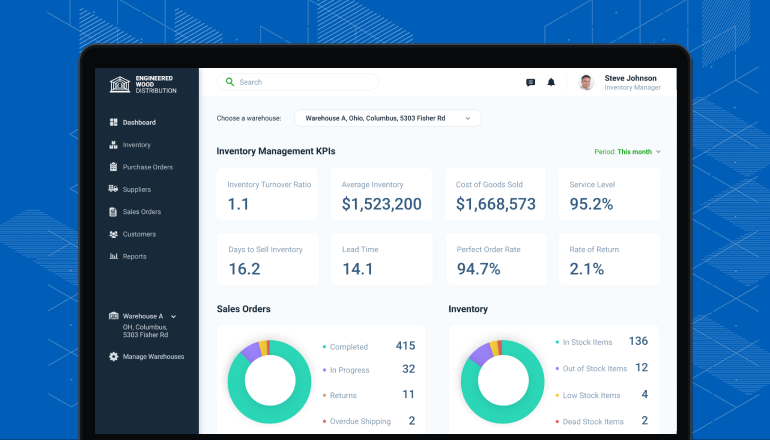
Non-obvious insight: Bizmation’s dashboard shows real-time sales and inventory changes in a single view, helping you spot trends instantly.
Inventory Management: Real-time tracking, barcode scanning, batch tracking, and automated reordering.
Order Management: Syncs orders from all channels, tracks fulfillment, and automates customer notifications.
Supplier Management: Manage purchase orders, supplier data, and payments.
Analytics & Reporting: Visual dashboards, sales trends, forecasting, and custom reports.
Returns Management: Streamlines returned goods, restocking, and customer refunds.
Bizmation also has modules for accounting, customer relationship management (CRM), and workflow automation. You can automate tasks like sending alerts when stock is low, emailing customers when orders ship, or launching promotions for slow-moving items.
Workflow Automation:
Bizmation offers workflow automation outside inventory, such as automating marketing emails when stock is low or when new products arrive.
For instance, if a new product is added, Bizmation can automatically notify your email subscribers. If inventory is running low, it can trigger a marketing campaign to boost sales before restocking.
Bizmation is trusted by thousands of businesses worldwide. It has won awards for innovation and customer service, and is recognized for its reliability and security.
Bizmation’s security features include encrypted data storage, role-based access, and regular backups. The platform is audited for compliance, making it suitable for businesses with strict data requirements.
Non-obvious insight: Bizmation is certified for integration with major payment and shipping providers, reducing setup time and ensuring smooth operations.
Switching to Bizmation brings a wide range of benefits that go beyond simple inventory tracking.
With Bizmation, you always know what’s in stock, what’s running low, and where each item is located. This prevents stockouts and overselling, two of the biggest pain points in e-commerce.
Bizmation’s real-time dashboards let you see inventory across all locations, including warehouses, stores, and marketplaces. You can track items as they move, from receiving to shipping, and spot discrepancies immediately.
Bizmation connects your website, marketplaces, and even physical stores. Inventory, orders, and customer data stay in sync across all platforms.
For example, if a product sells on Amazon, Bizmation updates stock on Shopify and your own site instantly. This avoids double selling and keeps your brand consistent.
Set reorder points for each product. Bizmation automatically creates purchase orders when stock falls below your chosen level. You never have to worry about running out.
Bizmation can also track supplier lead times, making sure you order at the right moment. You can set different reorder points for seasonal items, bundles, or products with unpredictable demand.
Returned items are automatically logged, restocked (if in good condition), and customer refunds are triggered. This makes returns management much less stressful.
Bizmation tracks reason codes for returns, helping you analyze product issues. If an item is damaged, it’s flagged and excluded from stock. The system can even send follow-up emails to customers, improving satisfaction.
Powerful analytics let you see which products are popular, predict future demand, and identify slow-moving items. You can act on facts, not guesswork.
Bizmation’s reporting tools help you segment data by channel, product, season, or customer group. You can spot trends, plan promotions, and adjust inventory levels based on real insights.
Get automatic alerts for low stock, delayed orders, or supplier issues. You can also automate routine tasks, freeing up your team.
Bizmation lets you set up custom workflows — for example, alerting staff when a high-value item needs extra inspection, or sending reminders for pending purchase orders.
By automating manual tasks, you save time and reduce costly mistakes. This directly improves your bottom line.
Bizmation’s automation reduces labor costs, shipping errors, and lost sales. You can track cost savings over time and reinvest in growth.
As your business grows, Bizmation grows with you. Add new products, warehouses, or sales channels without worrying about software limits.
Bizmation supports businesses from startups to large enterprises. You can expand globally, manage multiple currencies, and connect to international suppliers.
All your data is stored securely in the cloud, with regular backups and enterprise-grade security.
Bizmation offers features like two-factor authentication, audit logs, and user permissions to keep your business safe.
Bizmation offers friendly, expert support and training, so you can get help whenever you need it.
Support is available 24/7, including onboarding help, live chat, and detailed tutorials. Bizmation also provides webinars and community forums for ongoing learning.
Open API:
Bizmation’s open API lets you connect other tools, like accounting or marketing apps, for even deeper automation.
For example, you can integrate Bizmation with QuickBooks for seamless accounting, or connect to Mailchimp for automated email campaigns. This flexibility makes Bizmation ideal for complex businesses.
Let’s look at how Bizmation can transform a business, step by step.
With automated inventory and order tracking, staff spend less time on data entry and more time serving customers. Mistakes in shipments and stock counts drop sharply.
Bizmation provides real-time order processing, barcode scanning, and automatic updates across all channels. This means orders are shipped faster, inventory stays accurate, and customers get what they expect.
Adding a new sales channel, like eBay or a physical pop-up shop, is easy. Bizmation syncs inventory and orders automatically, so you don’t need a separate system for each channel.
Bizmation handles multi-location inventory, making expansion stress-free. You can launch new products or sales channels in days, not weeks.
Example:
A retailer launched on Amazon and Etsy after switching to Bizmation. They managed inventory from a single dashboard, avoiding the chaos of separate systems.
Bizmation’s analytics help you buy the right amount of stock. This prevents tying up cash in slow products or running out of hot sellers.
The system analyzes sales data, predicts demand, and suggests reorder quantities. You can set rules for seasonal items or bundles, optimizing inventory for every channel.
Automated purchase orders and supplier management mean you pay on time and never miss a key reorder. Bizmation tracks supplier performance, so you can negotiate better deals.
Bizmation stores supplier contact details, payment history, and delivery times. You can compare suppliers, spot trends, and build better partnerships.
Faster shipping, accurate orders, and instant updates lead to happier customers and more repeat business. Returns are handled smoothly, increasing trust.
Bizmation sends automated notifications, tracks delivery status, and manages returns with ease. Customers get clear communication, reducing complaints.
Non-obvious insight: Bizmation can automate customer feedback requests after each order, helping you collect reviews and improve your service.
A small online electronics store used Bizmation to automate their inventory and order management. Within a year, they doubled their product range, expanded to two more sales channels, and increased sales by 60%. Staff costs went down, while order accuracy went up.
Bizmation made it possible.
The store was able to launch new products faster, test new markets, and track performance in real time. Automation let them focus on growth instead of fixing inventory mistakes.
Here’s a real-world comparison of business performance before and after Bizmation:
|
Metric |
Before Bizmation |
After Bizmation |
|---|---|---|
|
Order Processing Time |
15 minutes/order |
6 minutes/order |
|
Inventory Accuracy |
87% |
99.5% |
|
Stockouts/Month |
8 |
2 |
|
Sales Channels Managed |
2 |
5 |
|
Customer Complaints |
12/month |
3/month |
Role-Based Permissions:
Bizmation’s role-based permissions let you control who can change inventory, pricing, or orders, reducing internal errors and fraud risk.
For example, only managers can adjust pricing, while warehouse staff can update inventory counts. This keeps your business secure and organized.
It’s clear that automation changes the game. But how does it stack up against manual systems, side by side?
|
Feature |
Manual System |
Bizmation Automation |
|---|---|---|
|
Inventory Updates |
Delayed, error-prone |
Instant, accurate |
|
Order Processing |
Slow, manual entry |
Automated, fast |
|
Multi-Channel Sync |
Requires duplicate entry |
Automatic, unified |
|
Analytics |
Limited, time-consuming |
Comprehensive, real-time |
|
Scalability |
Painful, limited |
Easy, flexible |
|
Cost |
High labor, errors |
Lower labor, fewer errors |
Additional comparison points:
Manual systems often require extra staff for audits and stock checks; automation reduces this need.
Automated systems allow you to track inventory movement historically, helping with fraud detection and loss prevention.
Bizmation can handle thousands of SKUs and complex bundling, while manual systems struggle after a few hundred products.
Adopting a new system can be daunting, but Bizmation makes it easy.
Visit the Bizmation website and create an account. Their onboarding team will guide you through setup.
Bizmation offers a guided onboarding process, including video tutorials, live chat support, and step-by-step instructions. You can schedule a demo to see how the platform works before committing.
Link your website, Amazon, eBay, or other sales platforms. Bizmation pulls in your inventory and orders automatically.
You can add multiple sales channels, set up custom integrations, and test connections before going live. Bizmation supports API connections for advanced setups.
Upload your current inventory via spreadsheet or barcode scan. The system checks for errors and helps you clean up your data.
Bizmation’s import tools can handle large inventories, detect duplicates, and flag missing information. You can set up product categories, SKUs, and warehouse locations.
For each product, set minimum stock levels and preferred suppliers. Bizmation will now monitor stock and automate reorders.
You can customize reorder rules, set up approval workflows, and track supplier lead times. Bizmation can send alerts via email, SMS, or push notifications.
Use Bizmation’s built-in tutorials and support to train staff. Most users are comfortable in a few hours.
Training materials include videos, written guides, and live webinars. You can assign roles and permissions, ensuring everyone uses the system correctly.
Start processing orders, tracking inventory, and automating tasks. Bizmation’s support team is available for questions.
Bizmation offers ongoing support, including troubleshooting, updates, and new feature guides. You can monitor performance, track KPIs, and adjust workflows as needed.
Sandbox Mode:
Bizmation offers a sandbox mode to test processes before going live, minimizing risk during transition.
You can simulate order processing, returns, and inventory updates in a safe environment. This helps you spot potential issues and train staff without disrupting operations.
Non-obvious insight: Bizmation can help migrate data from legacy systems, reducing the risk of errors during setup.
Automation works best when combined with smart practices. Here are some expert tips:
Audit Regularly: Even automated systems need occasional checks. Schedule regular audits to catch issues early.
Regular audits help spot discrepancies, prevent shrinkage, and improve accuracy. Use Bizmation’s audit logs to review changes and track performance.
Keep Data Clean: Enter product names, SKUs, and barcodes consistently. This avoids confusion and sync errors.
Clean data ensures smooth automation. Standardize naming conventions, update product descriptions, and verify supplier details.
Use Analytics: Don’t just track stock; review sales trends and adjust your buying strategy.
Bizmation’s analytics help you spot best-sellers, slow movers, and seasonal trends. Use this data to plan promotions, adjust pricing, and optimize inventory levels.
Automate Low-Value Tasks First: Start with simple automations (like order syncing) before tackling more complex workflows.
Focus on automating routine tasks, such as inventory updates and order processing. Once comfortable, expand to returns, supplier management, and marketing automation.
Review Supplier Performance: Use Bizmation’s reports to see which suppliers deliver on time and at the best cost.
Track supplier reliability, compare prices, and negotiate better terms. Bizmation can flag delayed shipments and suggest alternatives.
Dead Stock Tracking:
Track dead stock (items that don’t sell for months) and set up automatic discounts or clearance offers to free up cash.
Bizmation can trigger clearance campaigns, email offers, or suggest donations for unsold inventory. This helps keep cash flow healthy and warehouses uncluttered.
Non-obvious insight: Bizmation’s alert system can notify you when dead stock reaches a certain threshold, allowing proactive action.
Change can be tricky. Avoid these pitfalls:
Not Training Staff: Make sure all users understand the new system.
Untrained staff may enter wrong data or miss important steps. Invest in training and provide clear guides.
Ignoring Data Quality: Bad data in = bad results. Clean up your inventory records before importing.
Check for duplicate SKUs, missing product details, and outdated supplier info. Clean data ensures accurate automation.
Not Integrating All Channels: Sync every sales channel to prevent inventory mismatches.
Forgetting a channel can lead to overselling or stockouts. Bizmation supports multiple integrations; use them all.
Skipping Audit Trails: Keep logs of changes for accountability.
Audit trails help investigate errors, prevent fraud, and improve accuracy. Bizmation’s logs are easy to access and review.
Overcomplicating Workflows: Start simple and add more automation as you learn.
Avoid complex setups in the beginning. Focus on core tasks, then build advanced workflows as your team gains experience.
Non-obvious insight: Businesses often forget to update permissions after staff changes, leading to security risks. Review permissions regularly.

The next wave of e-commerce will be even more connected and data-driven. Automation tools like Bizmation are moving towards artificial intelligence (AI), offering predictive analytics, smarter demand forecasting, and even automated negotiation with suppliers.
AI-powered systems can:
Analyze social media trends to predict demand spikes
Recommend dynamic pricing based on market conditions
Optimize warehouse layouts for faster picking
Personalize promotions based on customer history and inventory levels
Bizmation’s roadmap includes AI features, such as auto-adjusting reorder points, suggesting new products, and optimizing delivery routes. These tools will help businesses stay ahead, reduce costs, and improve customer satisfaction.
Preparing for the future:
Start by automating core inventory tasks, then expand to AI-powered analytics and workflow automation. Stay updated with Bizmation’s feature releases and industry trends.
Those who embrace automation will lead the pack, while manual operators risk being left behind.
A few key trends are shaping the future:
Cloud adoption: Over 80% of new inventory systems are cloud-based, offering better security and flexibility.
Cloud systems allow remote access, real-time updates, and easy integration with other tools. Bizmation’s cloud platform ensures data is always available and secure.
Omnichannel retail: Businesses that sell on 3+ channels grow 2.5x faster than single-channel brands.
Omnichannel selling increases reach, builds brand awareness, and boosts sales. Automation makes managing multiple channels possible without extra workload.
Mobile management: Managers want to track inventory from their phones, and Bizmation’s mobile app delivers.
Mobile apps allow managers to check stock, approve orders, and review analytics on the go. This flexibility improves decision-making and keeps operations running smoothly.
For more data on e-commerce automation trends, visit the Shopify Enterprise Automation Guide.
Non-obvious insight: Businesses using mobile inventory management respond faster to customer needs and resolve issues more quickly.

Inventory management software automation is a technology solution that tracks, updates, and manages stock levels automatically. It replaces manual spreadsheets with real-time systems that sync inventory across all sales channels, automate reordering, and reduce errors.
Automation helps prevent overselling, improves order processing, and provides analytics for smarter decisions.
Bizmation offers integrations with popular e-commerce platforms such as Shopify, WooCommerce, Amazon, and eBay. You simply connect your accounts, and Bizmation syncs inventory and orders automatically.
You can also connect custom platforms via Bizmation’s open API.
Yes, Bizmation is scalable. It works for startups with a few products and large businesses with thousands of SKUs. You can start small and add features as you grow.
Bizmation’s pricing and features adapt to business needs, making it accessible for any size.
Bizmation provides 24/7 support via chat, email, and phone. They also offer onboarding assistance, tutorials, and a knowledge base to help you get the most from the platform.
Support includes troubleshooting, training, and regular updates.
Absolutely. Bizmation includes advanced analytics and forecasting tools. You can track best-sellers, predict future demand, analyze slow movers, and make data-driven stock decisions.
Reports are customizable and easy to share with your team.
Yes. Bizmation automates returns by logging returned items, updating inventory, and triggering refunds or exchanges. You can set custom rules for returns and track reasons for analysis.
Bizmation uses encrypted data storage, role-based access controls, and regular backups to keep your data safe. The platform is audited for compliance and supports two-factor authentication.
---
The e-commerce world isn’t slowing down. Manual inventory systems, once the norm, now hold businesses back. Inventory management software automation has become essential for staying competitive, and platforms like Bizmation make the shift easy and effective. With real-time tracking, automated processes, and deep business insights, Bizmation helps you grow faster, serve customers better, and cut costs. If you’re serious about e-commerce success, it’s time to explore Bizmation and make automation your secret weapon for smarter, scalable operations.
Non-obvious final insight: Early adopters of automation gain a lasting advantage in efficiency, customer satisfaction, and profit. Start automating now and position your business for long-term growth.