E-commerce is moving faster than ever before. Today’s shoppers expect quick delivery, real-time product information, and seamless experiences. But behind every smooth online order, there’s a complex network of warehouses, suppliers, and stock movements. Traditional inventory management—spreadsheets, manual counts, and reactive restocking—struggles to handle these demands. As a result, many businesses face out-of-stock issues, overstocked warehouses, and unhappy customers. The solution? Inventory management software automation. In this deep dive, we’ll explore how automation is reshaping e-commerce and why Bizmation stands out as a trusted partner for smart, scalable inventory control.
Keeping track of inventory by hand seems simple—until you try it at scale. E-commerce companies deal with hundreds or thousands of products, multiple warehouses, and rapid order flows. Here’s why traditional, manual inventory management struggles in this environment:
Manual entry is prone to mistakes. A single typo or missed count can lead to wrong stock levels, overselling, or missing orders. Over time, these small errors add up, causing big headaches for customer service and supply chain teams.
For example, imagine a staff member entering a “0” instead of an “8” while updating inventory. This small mistake might look unimportant at first, but it could result in overselling a product that’s actually out of stock. Customers who place orders may receive emails later saying their order cannot be fulfilled.
This damages trust in your brand. Human error can also cause duplicated entries, skipped items, or even entire products missing from the system. As inventory grows, so does the potential for these problems.
Another point often missed: manual systems rarely have a reliable audit trail. If an error is found, it’s very hard to trace back and see who made the mistake or when it happened. This makes correcting issues slow and stressful.
When you rely on spreadsheets or physical counts, it’s hard to react quickly. If a product suddenly becomes popular, manual systems may not catch low stock in time. This leads to stockouts, missed sales, and disappointed customers.
Suppose a social media trend makes one of your products go viral overnight. You might have enough stock for a normal week, but not enough for a sudden surge. By the time your team notices (maybe days later during a weekly count), you’ve already missed dozens or even hundreds of sales.
In fast-moving markets, speed matters. Manual systems simply can’t keep up with the pace needed to catch opportunities or fix problems before they hurt your business.
E-commerce thrives on speed. Customers expect to see what’s in stock, right now. Manual systems can’t update inventory across online stores, marketplaces, and warehouses in real time, leading to confusion and lost sales.
Imagine you sell on your own website, plus Amazon and Lazada. A customer buys the last item on your site, but your Amazon listing still says “in stock” because the spreadsheet isn’t updated. Now, you have to cancel the Amazon order, which can hurt your seller rating and future sales.
Real-time visibility isn’t just a “nice to have”—it’s crucial for modern e-commerce success.
What’s less obvious: lack of visibility also affects your suppliers and partners. If you don’t know exactly what’s on hand, you can’t give them accurate forecasts or plan joint promotions. This can harm relationships and make restocking slower.
Staff spend hours on repetitive tasks: counting items, updating lists, fixing mistakes. This time could be used for more valuable work, like improving customer experience or growing the business.
Consider a small team spending 10 hours a week on manual inventory tasks. That’s over 500 hours a year—time that could be invested in marketing, product development, or customer support. Manual processes also increase stress, as staff worry about making mistakes or missing important updates.
Morale drops, and turnover can increase, especially during busy seasons.
Another hidden cost: manual inventory tasks often require overtime or weekend work during big sales events. This can lead to burnout and higher wages, reducing your profit margins.
As your business grows, the problems multiply. Adding new sales channels, products, or locations becomes a burden. Manual systems buckle under the pressure, limiting your ability to expand.
For example, doubling your product lines means double the data entry, double the counts, and double the chance for mistakes. If you open a second warehouse, you’ll need to coordinate counts and updates between locations—often by emailing spreadsheets back and forth.
This slows everything down and makes errors more likely.
A less obvious challenge: scaling up often means hiring more people just to keep up with manual tasks. This raises costs and can introduce new errors as new staff learn the system.
Non-obvious insight: Even small e-commerce businesses can lose thousands in hidden costs due to overstocking or stockouts caused by manual errors. The true cost isn’t just lost sales, but damaged reputation and wasted resources.
To solve these challenges, many companies are turning to inventory management software automation. But what does this mean, and how does it work?
Automated inventory systems connect to your sales channels, warehouses, and suppliers. They update stock levels automatically whenever an order is placed, a shipment arrives, or a return is processed. This keeps data accurate and up to date across all platforms.
For instance, when a customer buys a product on your WooCommerce store, the system instantly reduces the available quantity everywhere—on your website, Shopee, and in your warehouse. Returns are handled smoothly too: when a product comes back, it’s scanned into the system and stock is updated immediately. This level of automation removes guesswork and stops issues before they start.
Beyond just tracking, automation can also handle complex actions. For example, if stock in one warehouse runs low, the system might automatically transfer inventory from another location or suggest a reorder from your supplier.
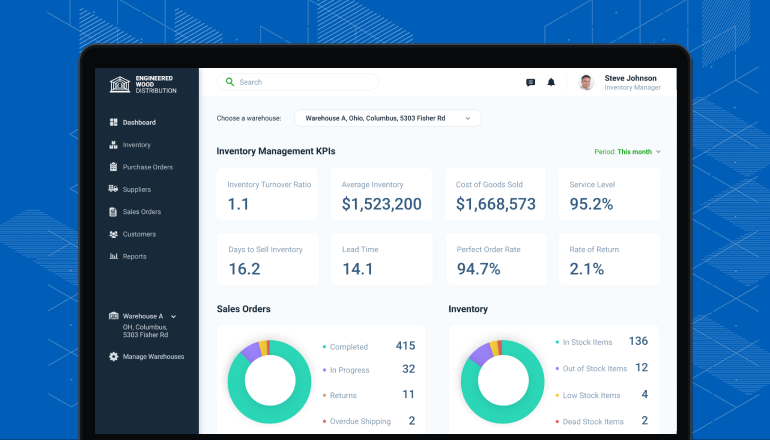
These tools gather data from every part of your supply chain. You can see sales trends, forecast demand, and spot slow-moving products—all from a single dashboard. This helps you make smarter purchasing and pricing decisions.
Centralized data means no more hunting through different files or asking team members for the latest numbers. You can easily see, for example, that blue shirts are selling fast on Lazada but slow on your website. With this knowledge, you might run a promotion on your site or shift marketing efforts where they’re most needed.
A non-obvious benefit: centralized data also makes financial reporting easier. When it’s time to close the books or prepare tax documents, all inventory information is already organized and accessible.
Modern systems can send automatic alerts when stock runs low, reorder points are reached, or unusual patterns appear. You can set up rules to automate reordering, transfers between warehouses, and even price changes.
Let’s say your best-selling phone case drops below 20 units. The software can send an alert to your phone and automatically create a purchase order for your supplier. If a product hasn’t sold in 60 days, the system can trigger a discount or suggest removing it from your catalog.
Advanced automation rules can even combine data from different sources. For example, if sales are high and reviews are positive, the system could increase the reorder quantity for the next shipment—helping you capture extra demand.
Inventory software often connects with accounting, shipping, and customer service platforms. This creates a smooth flow of information across your business, reducing manual work and errors.
For example, when an order is fulfilled, the inventory system can automatically update your accounting software with the cost of goods sold. Shipping labels can be generated instantly, and tracking numbers sent to customers. Customer service teams can see real-time inventory, so they can answer questions quickly without switching between systems.
A less obvious benefit: integration reduces “double entry” errors, where the same data is typed into two different systems. This not only saves time but also improves overall accuracy.
Real-time inventory updates across all sales channels
Barcode scanning for fast, accurate stock counts
Automated reorder triggers based on sales patterns
Multi-warehouse management to track stock in different locations
Reporting and analytics for better business insights
Some advanced solutions also offer batch and expiration date tracking—critical for food, health, and beauty products. This ensures you always ship the right items and reduce waste.
Non-obvious insight: Automation doesn’t just save time. It unlocks powerful forecasting tools that can predict demand spikes before they happen—helping you stay ahead of the competition.

Inventory automation is just one part of the e-commerce puzzle. Leading platforms go further, connecting inventory with other business processes to create a true competitive advantage.
Automated systems link inventory with order management and shipping. When a customer places an order, the system checks stock, reserves the item, and sends pick-and-pack instructions to the warehouse—all without human intervention. This speeds up delivery and reduces errors.
For example, as soon as a customer orders a new pair of headphones, the system checks which warehouse has the item in stock, creates a picking ticket, and notifies the shipping team. The customer receives an order confirmation with an estimated delivery date.
If the item is out of stock, the system can notify the customer instantly or even suggest similar products in real time.
What many miss: automation can also handle partial shipments. If some items are in stock and others are backordered, the system can split the order and update the customer automatically. This reduces confusion and keeps customers informed.
Some advanced tools use real-time inventory and sales data to adjust prices automatically. For example, if a product is selling out fast, the system can raise the price. If items are slow to move, it can trigger discounts or bundles.
This maximizes profit while keeping inventory healthy.
A practical example: if you have too many winter jackets at the end of the season, the system can start a 20% discount automatically. If a new gadget sells twice as fast as expected, the price can be adjusted upward to protect your margin and manage stock.
Less obvious: Dynamic pricing tools can help you avoid “dead stock.” By automatically lowering prices as products approach expiration or end-of-life, you recover cash that would otherwise be lost.
Returns are a big part of e-commerce. Automated systems handle returns by updating stock, generating return labels, and issuing refunds with minimal manual work. This creates a better experience for both customers and staff.
For example, when a customer requests a return, the system generates a prepaid label and updates the inventory count as soon as the item is scanned back in. Refunds are processed quickly, and customer satisfaction increases.
A further benefit: tracking reasons for returns helps you improve products and reduce future returns. If a particular item is often returned for the same reason, you can address the issue or adjust your product descriptions.
E-commerce businesses often sell on their own websites, plus marketplaces like Amazon, eBay, or Shopee. Automation keeps inventory levels in sync across all platforms, so you don’t oversell or run out unexpectedly.
Suppose you sell the same product on three marketplaces. When someone buys it on one channel, the quantity updates everywhere. This keeps your stock accurate and reduces the risk of negative reviews or penalties from marketplaces for overselling.
Many beginners overlook: multi-channel sync also helps with promotions and flash sales. You can quickly adjust inventory and pricing across all channels, staying consistent and competitive.
With all data in one place, businesses can analyze trends: which products are top sellers, which channels perform best, and where bottlenecks occur. This leads to smarter marketing, purchasing, and growth strategies.
For example, you might discover that a certain category sells best during weekends or that customers in a specific region prefer a certain product variant. These insights help you run targeted campaigns and adjust stock levels in the right locations.
Real-world example: A mid-sized online retailer using automated inventory and order management saw order processing times drop from 2 hours to just 20 minutes per day, freeing up staff for more strategic work.
Non-obvious insight: Connecting inventory automation with marketing tools allows for “just-in-time” promotions—running ads only when stock is available and pausing them automatically when supply runs low, maximizing your ad spend.
When it comes to inventory management software automation, Bizmation has become a name that e-commerce companies trust. But what makes Bizmation different? Let’s look at how this platform is designed for modern e-commerce challenges.
Bizmation was built with e-commerce in mind. Its features are tailored for businesses that need fast, accurate, and flexible inventory control, no matter how many channels or warehouses they use.
Unlike generic inventory solutions, Bizmation understands the unique needs of online sellers—such as flash sales, bundles, pre-orders, and international shipping. This focus means you get features that truly solve your daily challenges, not just basic stock tracking.
Many automation tools are powerful but difficult to use. Bizmation stands out with a clean, intuitive interface. Even users with limited technical skills can set up automations, track stock, and generate reports with just a few clicks.
For example, staff can create a new product or run a report without needing IT support. Training new employees takes hours, not days, which is especially useful during seasonal peaks or when scaling up.
A hidden advantage: a user-friendly system reduces resistance to change. Staff are more likely to use the software correctly, leading to better data and faster results.
Whether you’re a small online shop or a large enterprise, Bizmation grows with you. You can start with basic features, then add more advanced tools as your business expands.
If you begin with just one warehouse and 50 products, Bizmation works smoothly. As you add new sales channels, open more warehouses, or expand internationally, you simply activate new modules—no need to switch platforms.
Data security is a top priority for Bizmation. The platform uses strong encryption and regular backups to keep your business information safe and available at all times.
Bizmation’s servers are monitored 24/7. In case of a technical problem or disaster, your data can be restored quickly. For businesses handling customer information, this level of security is not just recommended—it’s required by data privacy laws in many countries.
Bizmation offers expert support to help you get the most from the system. Their team helps with setup, troubleshooting, and best practices, so you’re never left on your own.
Whether you need help integrating a new sales channel, setting up complex automation rules, or training your team, Bizmation’s support is just a call or message away. This personal touch is especially valuable for small businesses or teams without dedicated IT staff.
Non-obvious insight: Many e-commerce platforms claim to offer automation, but few provide truly customizable workflows like Bizmation. This flexibility allows businesses to tailor automation to their exact processes, not just generic tasks.
Switching to Bizmation brings a range of advantages. Here’s how it helps e-commerce businesses stay ahead:
Bizmation’s automation ensures your stock data is always current. This reduces the risk of overselling, stockouts, and costly errors. Your customers see the right information, every time.
This is especially important during big promotions, seasonal sales, or new product launches. When demand spikes, you need instant accuracy to avoid disappointing customers and losing future sales.
By automating repetitive inventory and order tasks, Bizmation frees staff to focus on growth. Businesses often see labor costs drop and productivity rise within weeks of switching.
For example, instead of spending hours every week entering data or checking stock, your team can analyze trends, develop new products, or improve customer service. Over time, these improvements add up to higher profits and a stronger brand.
With up-to-date stock levels and faster order fulfillment, customers get what they want, when they want it. This builds trust and loyalty, leading to repeat sales.
Happy customers are more likely to leave positive reviews, refer friends, and come back for future purchases. In e-commerce, reputation is everything—delivering a great experience every time is key to long-term success.
Bizmation syncs inventory across all your sales channels—from your own website to marketplaces and physical stores. No more manual updates or inventory mismatches.
This unified approach means you can expand to new marketplaces quickly, test new channels, and reach more customers without worrying about overselling or stockouts.
Get clear insights into sales trends, inventory health, and performance across channels. Bizmation’s reports help you make smarter decisions, from purchasing to promotions.
For example, you might discover that certain products sell best during holidays, or that one warehouse is consistently slower to fulfill orders. With this information, you can make targeted improvements that boost profits.
Bizmation connects with popular e-commerce platforms, payment gateways, and shipping providers. This means you can automate more of your business, with less manual setup.
If you already use Shopify for your website and Xero for accounting, Bizmation plugs right in. No need to change your entire tech stack—just connect and go.
Set custom rules for reordering, stock transfers, and alerts. Bizmation adapts to your business processes, not the other way around.
For instance, you can set special rules for high-value items, seasonal products, or items stored in different countries. This flexibility means you can handle complex inventory needs without extra manual work.
With real-time alerts and auto-reordering, you avoid running out of stock on best-sellers. This means fewer missed opportunities and more revenue.
This is especially important during busy periods like Black Friday or Singles’ Day, when demand can spike suddenly.
Add new products, warehouses, or sales channels without changing systems. Bizmation grows with your business, supporting expansion without extra headaches.
Whether you grow from 100 to 10,000 products, or from one to 10 warehouses, Bizmation handles the increased complexity automatically.
All business data is protected with modern encryption and secure cloud backups. You can focus on growth, knowing your information is safe.
For businesses handling sensitive customer data, this is more than just peace of mind—it’s a requirement for legal compliance and customer trust.
Non-obvious insight: Bizmation’s customizable alerts can notify you not only when stock is low, but also when trends shift—such as an unusual sales spike or a sudden drop in demand. This helps you respond proactively, not just reactively.
Automation is not just about saving time. For many e-commerce companies, Bizmation becomes the engine that powers growth and scalability. Here’s how:
With Bizmation, businesses eliminate manual bottlenecks. Orders are processed automatically, inventory is updated instantly, and reports are generated in seconds. This allows managers to focus on strategy, not data entry.
Teams can react faster to changes, launch new products with confidence, and run special promotions without worrying about operational chaos.
A subtle benefit: streamlined operations also reduce stress and improve morale among staff, leading to higher productivity and lower turnover.
Bizmation’s analytics tools turn raw data into actionable insights. You can see which products drive profits, which channels need improvement, and how seasonal trends affect demand. This leads to better forecasting and smarter growth plans.
For example, if analytics show that a new product is consistently selling out, you can increase future orders or raise prices to match demand. If another item has high returns, you can investigate and improve quality or descriptions.
Advanced users can even combine Bizmation’s analytics with marketing data to run highly targeted campaigns—maximizing return on investment.
Selling on multiple platforms is easier with Bizmation. The system keeps inventory and orders synchronized, so you can add new sales channels without extra work or risk of errors.
If you want to start selling on a new marketplace, you simply connect it to Bizmation. The platform takes care of syncing inventory and updating orders—no need for extra staff or complicated spreadsheets.
This flexibility lets you test new channels, reach new markets, and grow revenue quickly.
With clear data on stock levels and sales trends, businesses can negotiate better terms with suppliers. Automated purchase orders and restocking help maintain strong supplier partnerships.
Suppliers value reliable, predictable partners. If you can show accurate forecasts and place orders on time, you can often negotiate better prices, faster delivery, or exclusive deals.
A less obvious benefit: automation can help you spot supplier issues early. If deliveries are consistently late or short, you’ll see it in your reports and can address it before it hurts your business.
Fast, accurate order fulfillment and real-time stock information lead to happier customers. Satisfied customers are more likely to return and recommend your brand.
Automation also allows you to offer features like “back in stock” notifications, pre-orders, and instant order tracking—giving your business an edge over competitors.
Whether you manage your own warehouse or use drop shipping, Bizmation adapts. The platform supports different workflows, helping you scale or pivot as the market changes.
For example, you might start with drop-shipping, then add your own warehouse as you grow. Bizmation makes it easy to transition between models or even run both at the same time.
Example: A retailer using Bizmation expanded from one to four warehouses in a year—without hiring additional staff—thanks to automation and centralized control.
Non-obvious insight: Automation frees up cash flow by reducing the need to keep excess “just in case” stock, allowing you to invest more in marketing, product development, or new markets.
To see the impact clearly, let’s compare manual and automated inventory management side by side.
|
Feature |
Manual Management |
Automated (Bizmation) |
|---|---|---|
|
Stock Updates |
Handwritten or spreadsheet, often delayed |
Real-time, automatic across all channels |
|
Error Rate |
High (human error, missed counts) |
Low (automated checks and balances) |
|
Order Processing |
Manual, time-consuming |
Instant, automated workflow |
|
Scalability |
Difficult to expand |
Easy to add products, warehouses, channels |
|
Analytics |
Basic, often outdated |
Advanced, real-time insights |
|
Cost |
Hidden labor and error costs |
Lower long-term cost, more efficiency |
|
Integration |
Rare, mostly manual |
Seamless with other business tools |
|
Returns Handling |
Manual entry, slow updates |
Automated restock, instant refunds |
|
Custom Workflows |
Rigid, limited by staff capacity |
Highly customizable, scalable |
Practical tip: Use this comparison to identify which areas of your current process need the most urgent improvement.
Bizmation offers a rich set of features. Here’s a closer look at the tools that make it stand out for e-commerce businesses:
Bizmation keeps your inventory up to date across all sales channels. Sell a product on your website, and the stock updates instantly on Amazon, eBay, and other platforms. This prevents double-selling and out-of-stock problems.
For example, if you sell a single unit of a product on Shopee, the system instantly adjusts the available quantity everywhere else. If you run a flash sale, you can be sure your inventory is always accurate.
Set reorder points for each product. When inventory drops below the threshold, Bizmation creates a purchase order and notifies your supplier—no manual work needed.
You can customize reorder quantities based on sales history or supplier lead times, ensuring you always have enough stock without over-ordering.
A less obvious benefit: automated purchase orders can include supplier-specific notes, attach documents, and even track order status—saving time on follow-up.
Use barcode scanners or a mobile app to check, receive, and transfer stock quickly. This reduces counting errors and speeds up warehouse work.
For example, during a stocktake, staff simply scan barcodes with their phones or dedicated scanners. The system updates instantly, reducing the risk of mistakes.
Mobile access means you can check inventory or approve orders on the go—useful for managers who travel between locations.
Track inventory across multiple warehouses. Transfer stock between locations, manage returns, and monitor warehouse performance from one dashboard.
This helps you optimize storage, reduce shipping times, and keep costs down. Bizmation can also track bin locations, batch numbers, and expiration dates for more complex products.
Get instant alerts for low stock, delayed shipments, or unusual sales trends. Bizmation lets you customize alerts based on your needs.
For example, you can set up alerts for products with high return rates, items approaching expiration, or sudden drops in sales. This allows you to act before problems grow.
Bizmation connects with Shopify, WooCommerce, Magento, and major marketplaces. This means orders, inventory, and customer data flow smoothly between systems.
Integration also extends to popular accounting software (like QuickBooks or Xero) and shipping solutions (like ShipStation or DHL), creating a truly unified business process.
Analyze sales by product, channel, or time period. Identify slow movers, top sellers, and seasonal trends to make better stocking decisions.
Reports can be exported for further analysis or shared with your team, making it easy to run regular reviews and spot opportunities for improvement.
Create rules to automate routine tasks—like reordering, stock transfers, or sending reports. Bizmation adapts to your unique business processes.
Advanced users can even build workflows based on multiple triggers, such as “if sales exceed 100 units per week, reorder and raise price by 5%. ”
Tip: Use Bizmation’s reporting to identify not just best-sellers, but also products that tie up cash by moving slowly. Reducing slow-moving stock frees up resources for growth.
For a clearer understanding, here’s a side-by-side comparison of Bizmation with two popular inventory automation competitors.
|
Feature |
Bizmation |
Competitor A |
Competitor B |
|---|---|---|---|
|
Multi-channel Sync |
Yes, real-time |
Yes, delayed updates |
No |
|
Custom Automation Rules |
Highly customizable |
Limited |
Basic |
|
Mobile App & Barcode Support |
Yes |
No |
Yes |
|
Integration Options |
Wide range |
Standard only |
Few |
|
Pricing |
Competitive, scalable |
Higher, fixed tiers |
Low, limited features |
|
Support |
Expert, dedicated |
Email only |
Community forum |
|
Returns Management |
Automated, integrated |
Manual, separate system |
Basic, limited |
|
Reporting & Analytics |
Advanced, customizable |
Standard templates |
Minimal |
|
Warehouse Management |
Full support |
Partial |
No |
Non-obvious insight: When comparing solutions, look beyond price and check which features truly fit your business needs—cutting corners on features now can mean much higher costs later.
Let’s look at how Bizmation has helped real e-commerce businesses:
A mid-sized fashion retailer used spreadsheets for stock tracking. After moving to Bizmation, they integrated their website, two physical stores, and an online marketplace. Inventory was synced in real time, and out-of-stock incidents dropped by 75%. Staff time spent on order management fell by 60%, allowing the team to focus on marketing and growth.
A detail often overlooked: this retailer also improved customer experience by offering in-store pickup for online orders, thanks to accurate, real-time inventory visibility across all locations.
An electronics company wanted to sell internationally but struggled with multi-warehouse management. With Bizmation, they automated stock transfers, synced inventory across three countries, and reduced shipping errors by 80%. Sales grew by 30% in the first year after automation.
A key factor in their success: Bizmation’s analytics helped them identify which products were popular in each region, allowing them to optimize stock and marketing for local demand.
A health products brand faced complaints about slow shipping and incorrect orders. Bizmation automated their order fulfillment and returns. Customer satisfaction scores rose from 3. 8 to 4. 6 out of 5, and repeat purchases increased by 40%.
Beyond faster shipping, automation also reduced mistakes in packing similar-looking products—a common issue for health and beauty brands with many variants.
A gift shop struggled every holiday season with sudden spikes in orders and returns. After switching to Bizmation, they handled a 3x increase in order volume without hiring extra staff. Automation managed the surge, and the business could focus on creating new gift bundles and promotions.
Non-obvious insight: Even businesses with a small product range can see big improvements in efficiency and customer experience after switching to automation.
Ready to automate your inventory management? Here’s how to begin with Bizmation:
List your sales channels, warehouses, and current inventory methods. Identify where errors or delays most often occur.
For example, ask your team: Where do we spend the most time? Where do mistakes happen? Which processes slow us down during busy periods?
Decide which systems (e-commerce platform, accounting, shipping) you want to connect with Bizmation. The more integrated your setup, the more you benefit from automation.
If you’re unsure, start with your main sales channel and add others over time. Bizmation’s support team can help prioritize which connections will deliver the fastest return on investment.
Sign up for Bizmation and import your product, stock, and supplier data. Bizmation offers tools and support to make this step smooth.
If your current data is in spreadsheets or another system, Bizmation provides import templates and assistance to get you started quickly and accurately.
Work with Bizmation’s support team to set up reorder points, alerts, and other automation rules tailored to your workflow.
Don’t be afraid to start simple. You can always add more rules as you learn what works best for your business.
Bizmation’s user-friendly interface helps reduce training time. Make sure all staff know how to use the system for their daily tasks.
Offer hands-on practice and encourage questions. The more confident your team is, the smoother your transition will be.
Use Bizmation’s analytics to track performance. Adjust automation rules as your business needs change, and expand features as you grow.
Review reports regularly to spot issues or opportunities. Don’t hesitate to reach out to Bizmation support for advanced tips or troubleshooting.
Tip: Start with a pilot phase—use Bizmation for one warehouse or sales channel first. This allows you to see the benefits and adjust before rolling out across your whole business.
Non-obvious insight: Involving your staff in the setup process helps them feel ownership and reduces resistance to new technology.
The pace of e-commerce will only speed up. Here’s how automation and platforms like Bizmation are shaping the future:
AI-powered systems will not only track current stock but also predict future demand. This means smarter purchasing and less waste.
For example, the system might notice that umbrellas sell more before the rainy season and suggest increasing orders automatically. Predictive tools learn from your own sales history, plus market data, to help you stay ahead.
Automation will connect suppliers, warehouses, and delivery partners for end-to-end visibility. Businesses will spot problems early and respond faster.
If a shipment is delayed, the system can adjust delivery estimates and suggest alternatives—before customers even notice a problem.
Automated systems will help businesses offer personalized shipping options and dynamic pricing, based on live inventory and customer preferences.
For instance, customers in one region may see faster shipping options or special deals on products that are in local stock. This level of personalization builds loyalty and increases conversion rates.
With better data, businesses can reduce overstock and waste—cutting costs and supporting sustainability goals.
For example, you can track which products are often discarded due to expiration and adjust your orders, reducing both losses and environmental impact.
External reference: For a deeper look at inventory management automation trends and benefits, see this Inventory Management Software overview.
Non-obvious insight: The future of automation isn’t just about “doing things faster.” It’s about using data and smart tools to build more resilient, flexible businesses—ready for whatever comes next.

Inventory management software automation uses digital tools to track, update, and manage stock levels automatically. It connects to sales channels, warehouses, and suppliers, updating data in real time and reducing manual work and errors.
Bizmation monitors inventory across all channels. It sends alerts and automates reordering when stock is low, and provides analytics to help avoid over-purchasing. This balances supply and demand, reducing both stockouts and excess inventory.
Yes, Bizmation offers integration with popular e-commerce platforms like Shopify, WooCommerce, and Magento. It can also connect with accounting and shipping tools for a seamless business workflow.
Absolutely. Bizmation is designed to scale. Small businesses can start with core features, then add more tools as they grow. The user-friendly interface makes it easy for teams with limited technical skills to use.
Bizmation offers expert onboarding, setup help, and ongoing support. Their team assists with integration, training, and troubleshooting to make sure you get the most out of the platform.
Bizmation uses industry-standard encryption and regular backups to keep your business data safe. Access controls and audit logs add extra layers of protection, so you can trust your information is secure.
Many businesses notice improvements—like fewer errors, faster order processing, and better inventory accuracy—within the first month. Full benefits grow as you add more automation and integrations.
Yes, Bizmation allows you to set custom rules for reordering, stock transfers, alerts, and more. This means you can tailor the system to your exact needs, not just use generic templates.
Bizmation can automate the returns process, update inventory automatically, and generate refund reports. This reduces manual work and improves the customer experience.
E-commerce is evolving rapidly, and manual inventory management just can’t keep up. Automation, especially with a dedicated platform like Bizmation, transforms not just how you track stock—but how you grow, serve customers, and compete. As the industry moves forward, inventory management software automation isn’t just a smart choice—it’s essential for any business that wants to thrive.
Explore Bizmation to bring your e-commerce operations into the future.